Multi-TF contexts
ATR lots per timeframe, Trend Align across M1–D1, and separate Trail / CCC / RSI timeframes so the desk sees what you care about.
Size risk, place trades, arm a profit TP, and run Trail, CCC, and session rules from one panel — without leaving the chart.
Windows MetaTrader 5 only — not phone or Mac apps.
Trading can lose money. RiskDesk is software only: not a broker, and not a promise of any trading result.
Live plans from $29 · Free demo · Crypto via NOWPayments · 24/7 help: @riskdesksupportbot
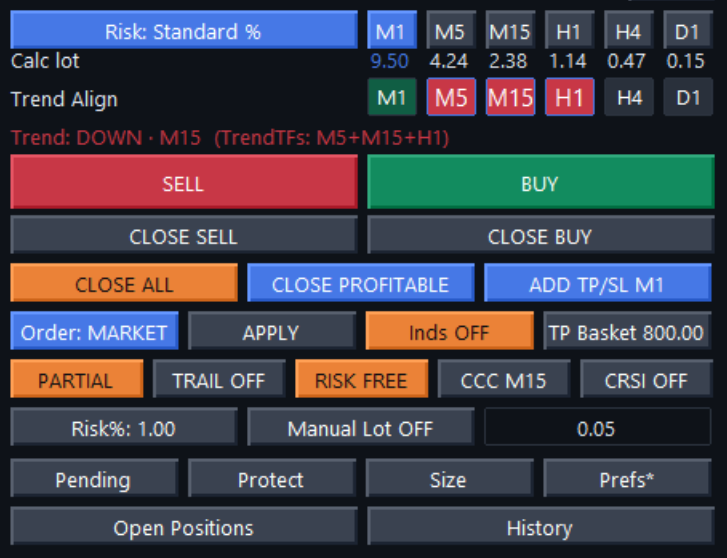
RiskDesk is desktop software for Windows MetaTrader 5: a trading panel for position sizing, market and pending orders, and stop/target tools. It reads several timeframes and can run actions you arm (Trail, CCC, session rules). You stay in control.
RiskDesk is an independent third-party Expert Advisor. It is not made or approved by MetaQuotes. It is not a broker, it does not open a trading account, it does not hold or manage your money, and it does not give investment advice or promise any trading result.
ATR lots per timeframe, Trend Align across M1–D1, and separate Trail / CCC / RSI timeframes so the desk sees what you care about.
Arm Trail, CCC, CRSI, RSI Entry (+ pullback), sessions, and news blackouts once. When conditions hit, the assistant acts immediately.
Not a signal feed. Not set-and-forget hype. Your plan, your rules, your click — with a desk that watches and executes without delay.
Trading is risky. RiskDesk helps you manage size, targets, and exits. It does not reduce risk to zero. You are responsible for every order.
Load a KEY=VALUE plan from RiskDesk_Plan.txt, then APPLY to place and arm the trade under your risk settings.
Split targets with TP1 / TP2 and percent shares so partials are defined in the plan text, not only by hand on the chart.
Classic invalidation on TF candle close beyond a level cancels the pending when the idea is gone.
For limits and stops: if price reaches the target zone before fill, the pending is cancelled so you are not left chasing a filled-elsewhere idea.
Trade plans can arm breakeven at an R multiple, then trail after BE — still under rules you accept on APPLY.
Refresh also clears Inv, Expire, Ladder, RF@R, and Plan arm so the desk returns to a clean state. Calendar stays.
The download is one compiled EX5. You paste it into MT5 (File → Open Data Folder → MQL5 → Experts → Refresh) and attach it to a chart. It does not install any other program. Paid licenses contact https://api.riskdesk.dev to check the license (MT5 login and license token). Calendar uses the same address and can save a small cache file in the MT5 data folder. To remove it, detach it from the chart and delete the EX5 from Experts.
Start live with 3 months — or try the free demo first.